Referral Program
How the Program Works
The referral program lets you earn rewards on purchases made by the users you invite, up to 5 levels deep.
You earn a percentage:
- on purchases by users you invited personally
- on purchases by users in your structure down to Line 5
The size of your reward depends on your level in the program.
Program Structure
The program includes:
- 5 levels (Level)
- 5 structure lines (Line)
- a dynamic reward percentage
Program Activation
To get access to your referral link:
You need to own at least 1 asset:
- a tree
- a share
- any other platform asset
If you signed up without a referral link
Enter a referral code in the Business section
Once activated, the full functionality of the program becomes available to you
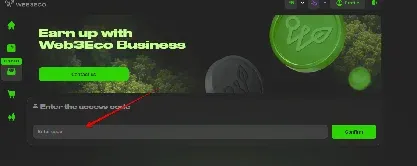
How to Invite a Referral
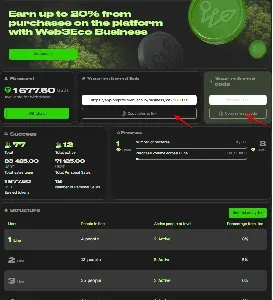
Step 1. Find your referral link
Once the program is activated, you will see:
- your personal referral link
- the Copy referral link button
Step 2. Copy the link
Step 3. Send the link to a user
Step 4. The user signs up using your link
Structure Lines
| Line | Description |
|---|---|
| 1 Line | Users you invited |
| 2 Line | Users invited by your referrals |
| 3–5 Line | The following levels of the structure |
Rewards
The percentage depends on your level.
| Level | 1 Line | 2 Line | 3 Line | 4 Line | 5 Line |
|---|---|---|---|---|---|
| 1 | 8% | 5% | - | - | - |
| 2 | 8% | 5% | 4% | - | - |
| 3 | 8% | 5% | 4% | 2% | - |
| 4 | 8% | 5% | 4% | 2% | 1% |
| 5 | 8% | 5% | 4% | 2% | 1% |
How to Level Up
Your level depends on
- the number of assets you own
- your sales volume
- the activity of your structure
Core Requirements
| Level | Core requirements |
|---|---|
| 1 | Any asset |
| 2 | >0.1 ha + $10,000 in sales |
| 3 | >0.25 ha + $50,000 in sales |
| 4 | >0.5 ha + $100,000 in sales |
| 5 | >1 ha + $200,000 in sales |
Important
After you level up:
- the new percentages apply only to future purchases
- past earnings are not recalculated
How Rewards Are Calculated
Calculation Principle
You earn a percentage on purchases made by users in your structure.
The size of the percentage depends on:
-
your current level
-
the line the user belongs to
Reward Calculation Example
Example 1
You have:
Level 1 Your Line 1 referral makes a purchase of:$1,000 Your reward:8% = $80
How to Withdraw Rewards
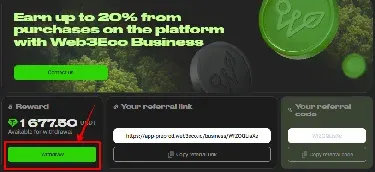
Step 1. Go to the Reward block
This section shows:
- the balance available for withdrawal
Step 2. Click Withdraw
The Withdraw button is active:
- if there are available funds on your balance
How Progress Works
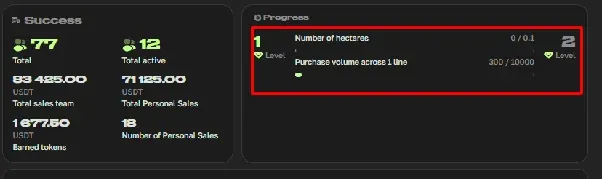
The Progress block shows:
- your current level
- your progress toward the next level
Progress Displays
- sales volume
- structure volume
- level requirement completion
- partner activity
How to View Your Structure
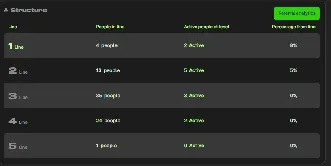
Go to the Structure block
This block shows:
- the number of referrals
- active users
- percentages by line
- your structure list
Who Counts as an Active Referral
An active referral is a user who has made at least 1 sale
FAQ
When is a reward credited?
After an invited user makes a purchase.
Why don’t I have a referral link?
You need to own at least 1 asset.
Can I change my referrer?
No, once activated the referral code cannot be changed.
Are past rewards recalculated after I level up?
No. The new percentage applies only to new purchases.
Where can I view my structure?
In the Structure block.
Where can I view my available balance?
In the Reward block.
Why isn’t a user showing up in my structure?
The user must sign up specifically through your referral link or activate your referral code.